
Engineering note
Can ChatGPT Build a Real Website? An Honest Developer Review
A full-stack developer tests whether ChatGPT can build a real website, reviews the result, and explains where professional judgment still matters.
Abu Hurarrah is a full-stack engineer who builds web platforms, WordPress solutions, APIs, and cloud-backed applications.
I tested a simple question with a practical build: could ChatGPT help create a small, responsive business website that I would feel comfortable putting in front of a real client? The short answer is yes, but with an important qualification. ChatGPT can produce a credible starting point quickly. It does not remove the need for someone to define the requirements, inspect the generated code, test the browser behavior, and decide whether the result is safe to publish.
For this review I used a focused landing-page brief for a fictional remote bookkeeping service called LedgerLift. I asked for a navigation bar, hero section, service cards, process section, contact call to action, semantic HTML, responsive styling, and basic metadata. I then reviewed the generated result as I would review a small client website: visual consistency, mobile layout, accessibility, SEO basics, maintainability, and whether the form implied functionality it did not actually have.
What building a website actually means
A lot of confusion comes from the phrase “build a website”. It can mean several different things. ChatGPT can generate HTML, CSS, React components, copy, metadata, and deployment instructions. In Canvas, OpenAI describes a coding workspace where ChatGPT can help edit and preview code. Codex goes further as a coding agent that can work across files and tools. ChatGPT Sites adds a hosted website workflow for supported accounts and regions.
Those are useful capabilities, but they are not the same thing as delivering a production-grade website. A production site also needs correct requirements, brand direction, content ownership, accessibility checks, image optimisation, secure forms, analytics, deployment configuration, crawlable links, monitoring, and a maintenance plan. Generating code is one part of that chain. Publishing a reliable site is the whole chain.
How I tested ChatGPT website generation
The brief was intentionally small: create a polished landing page for a fictional remote bookkeeping service. I chose plain HTML and CSS for the experiment so the result could be inspected without hiding quality issues behind a component library. The requirements were realistic for a small business page: navigation, a strong hero, three service cards, a simple process section, a contact form, responsive behavior, accessible structure, and basic metadata.
The evaluation criteria were practical rather than theatrical. I checked whether the page had one clear H1, whether navigation links worked, whether the layout adapted on a 390px-wide mobile viewport, whether form controls had labels or accessible names, whether the copy made a believable offer, whether metadata existed, and whether the implementation could be deployed as a static page. I also checked for signs that a non-developer might miss, such as a form button that appears to submit an enquiry even though no backend exists.
Create a responsive landing page for a fictional remote bookkeeping service called LedgerLift. Include navigation, a hero section, service cards, a process section, a contact CTA, semantic HTML, accessible form fields, mobile styling, and basic metadata. Keep it deployment-ready as a static page.The result
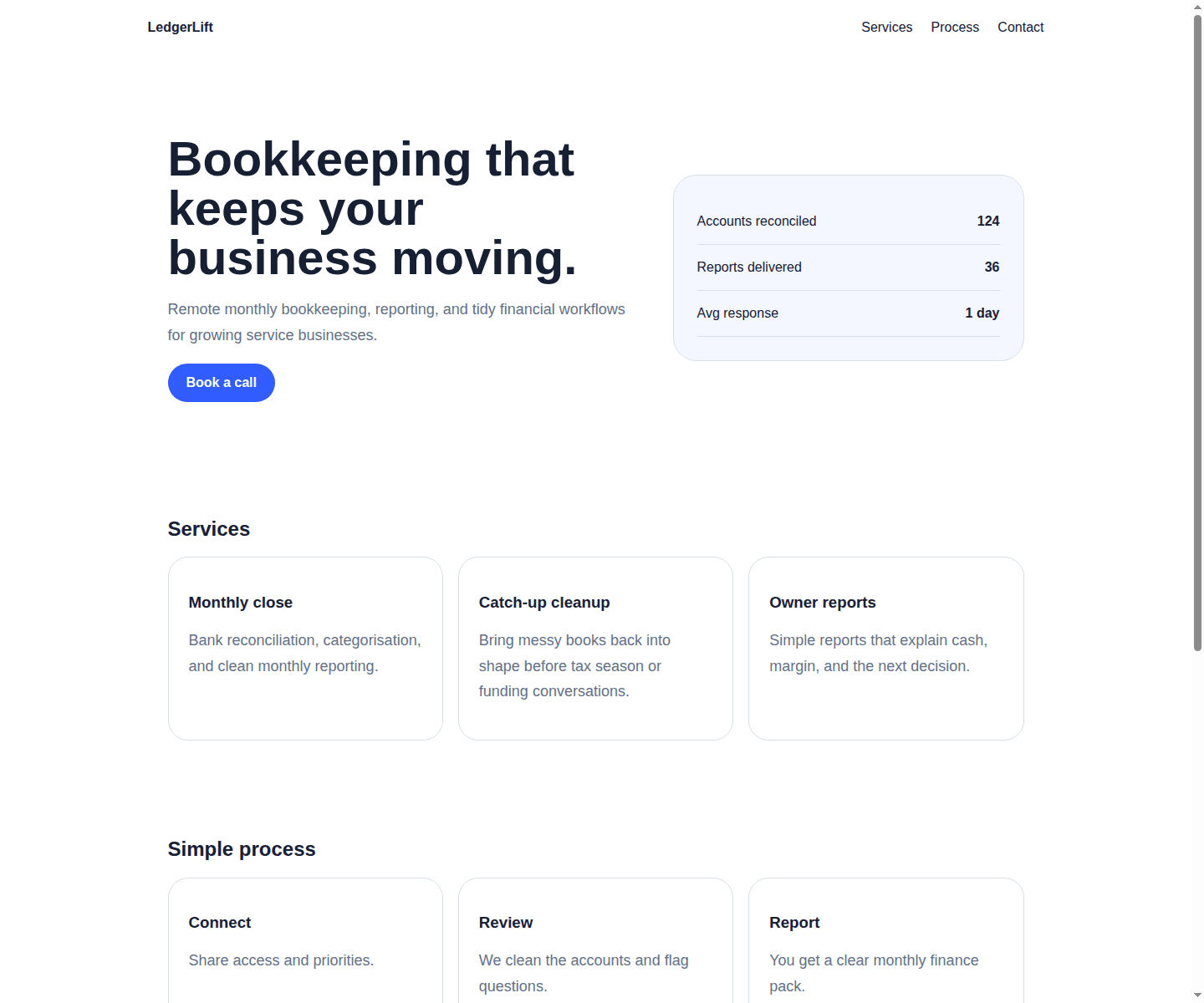
The first pass was better than a blank file. It created a recognisable page with a nav, headline, service sections, process cards, and a contact area. The HTML used landmarks such as header, main, section, article, aside, and footer. It also included a viewport tag and a meta description. For a prototype, that is genuinely useful.
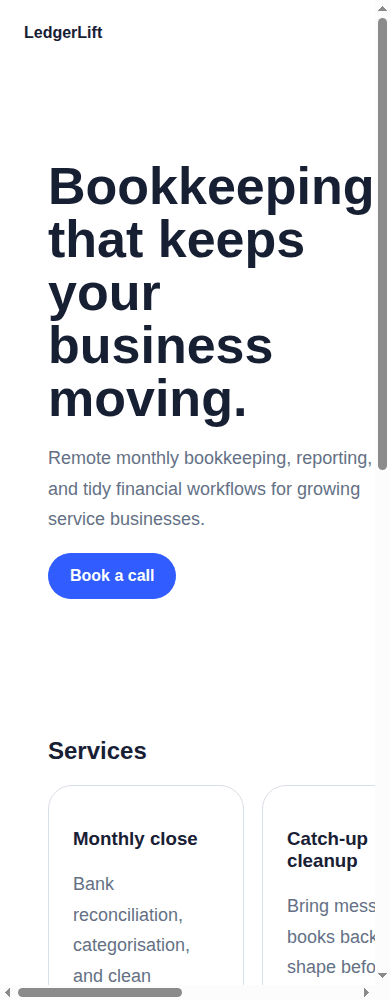
But the first pass also exposed the main risk of AI-generated website work: plausible code can still be wrong in ways that only show up during review. The mobile breakpoint set a minimum page width of 720px, which caused horizontal overflow on a phone-sized viewport. The button in the form looked like a working enquiry flow, but there was no submission behavior, validation, spam protection, privacy copy, or backend endpoint. The design was serviceable, but generic. The copy also needed sharper positioning.
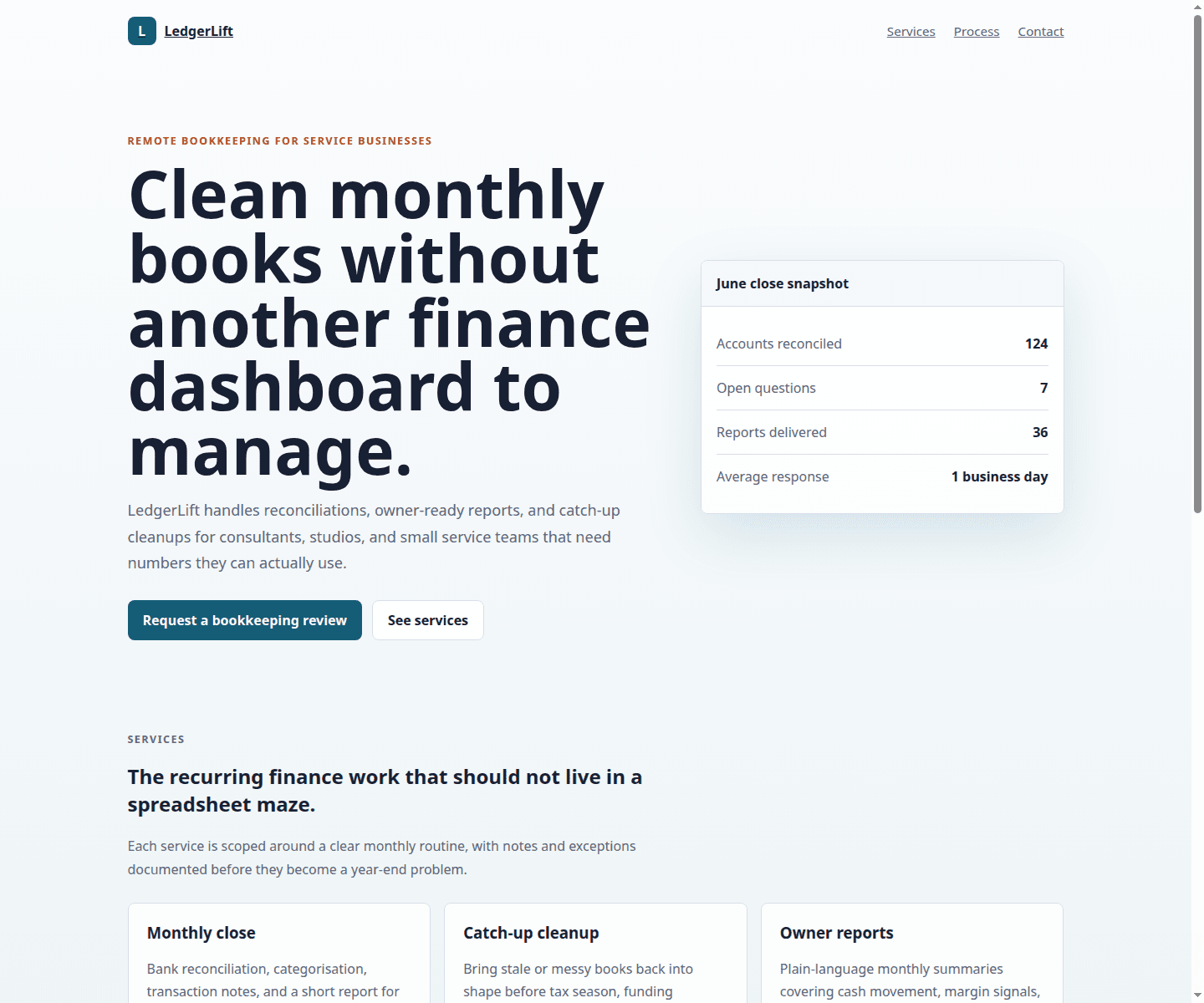
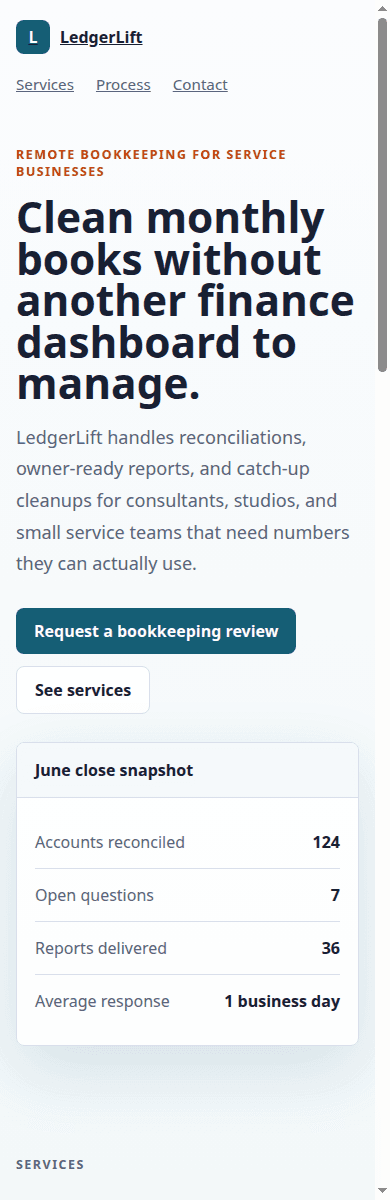
After developer review, I corrected the responsive layout, replaced fixed mobile widths with fluid constraints, improved the visual system, added visible labels to form fields, clarified that the demo form is static, tightened the information hierarchy, and added focus states and reduced-motion handling. I also refined the copy so the business offer sounded less like a template.
Responsive review
The mobile check changed the verdict.
The reviewed page did not simply look nicer on desktop. It behaved differently on a narrow viewport: navigation wrapped cleanly, the hero remained readable, the stats panel stayed inside the screen, and the call-to-action buttons kept useful touch targets. That is the difference between a generated page that demos well and a small website that can survive real visitors.
Where ChatGPT performed well
ChatGPT was strongest at turning a structured brief into a first implementation. It did not need to be told what a typical landing page contains. It produced the expected sections, chose reasonable placeholder copy, and used reusable card patterns. That matters because many early website tasks are repetitive: sketch the page structure, create sections, wire anchor links, add starter styles, and produce the first version of copy.
It also helped with implementation speed. Once the first page existed, the review could focus on concrete issues instead of abstract planning. This is where ChatGPT is useful for developers: it can create draft components, explain unfamiliar code, suggest alternatives, and handle repetitive markup while the developer stays responsible for judgment.
- Converting the brief into a complete initial page structure.
- Creating semantic sections and a reasonable content order.
- Producing starter metadata and viewport configuration.
- Generating repeated card markup without much friction.
- Responding well to precise follow-up instructions about layout and accessibility.
Where developer intervention was required
The most important corrections were not exotic. They were ordinary frontend review. The first generated CSS used a mobile media query that preserved a desktop minimum width. That is exactly the kind of defect that can slip through if someone only looks at the desktop preview. The final version used fluid containers, single-column mobile sections, and stable card spacing.
Accessibility also required attention. The first version had accessible names on inputs through aria-labels, but visible labels are usually clearer for real users. I added visible labels, stronger focus states, and a reduced-motion rule. I also checked heading order and link labels. None of this is glamorous, but it is part of professional website work.
The contact form is another practical example. ChatGPT can draw a form quickly. It cannot know whether the site should send email, write to a CRM, use a serverless function, include spam protection, store consent, or avoid collecting certain data. That is architecture and product judgment. For this demo, the honest correction was to make the button non-submitting and state that the form is static.
header,
main,
footer {
  width: min(1120px, calc(100% - 32px));
  margin: 0 auto;
}

@media (max-width: 820px) {
  .hero,
  .split,
  .grid {
    grid-template-columns: 1fr;
  }
}
Can a non-developer use ChatGPT to build a website?
Yes, for the right kind of site and with realistic expectations. A non-developer can use ChatGPT to plan pages, draft copy, compare platform options, generate a simple static prototype, or prepare content for a website builder. With ChatGPT Sites, some users can create and publish supported web experiences directly, but OpenAI’s own help documentation says availability, sharing, public publishing, runtime support, and account settings matter. It also tells users to review content, access settings, links, forms, and interactive behavior before publishing.
The risk is not that non-developers are incapable. The risk is that generated code can look finished before it has been tested. If the site is a personal page, temporary campaign page, or simple internal prototype, that risk may be manageable. If the site collects leads, handles payments, stores personal data, depends on authentication, or represents a serious business, publishing generated code without review becomes a poor tradeoff.
Can ChatGPT replace a web developer?
For a simple personal page or a narrow landing page, ChatGPT may replace some implementation work. It can help a founder or marketer get from idea to prototype quickly. For small business websites, it can reduce cost and speed up planning if a human still checks the final result. For content websites, ecommerce, authenticated applications, payment systems, dashboards, and complex business platforms, it does not replace a developer.
The reason is responsibility. A developer is not only typing code. The job includes deciding what should be built, where data lives, what happens when a request fails, how updates are deployed, how accessibility is checked, how SEO metadata is represented, how analytics are wired, how secrets are protected, and how future changes will be maintained. ChatGPT can assist with many of those tasks, but it does not own the consequences.
Limitations and critique
The quality of the result depends heavily on the brief. A vague prompt produces vague architecture. If you ask for a “modern website”, you will often get a generic hero, broad feature cards, and copy that could belong to almost any business. Good output usually needs context: audience, offer, constraints, brand tone, required pages, conversion goal, integrations, and examples of what should be avoided.
Generated interfaces can also become inconsistent after many unstructured revisions. One prompt changes the hero. Another changes the cards. A third changes the form. Without a design system or component boundaries, spacing, colors, naming, and behavior can drift. This matters on real websites because maintenance is not only about the first launch; it is about the sixth change request months later.
Security and accessibility are not guaranteed. A generated form might omit validation, rate limiting, spam handling, consent language, or safe error behavior. A generated UI might miss keyboard states, labels, contrast, or mobile edge cases. SEO can also be incomplete: title and description are only the beginning. A real site may need canonical URLs, Open Graph data, structured data, crawlable internal links, image alt text, sitemap inclusion, robots checks, and content that deserves to rank.
Product capabilities also change. ChatGPT, Canvas, Codex, and Sites are related but different workflows, and availability can depend on plan, region, workspace settings, and the supported runtime. That is why I avoid treating any one interface as a permanent definition of “AI website builder”. The safer assessment is capability-based: what can the workflow generate, what can it run, what can it deploy, and what still needs human review?
Final verdict
ChatGPT can build a useful website prototype and, for simple cases, a publishable starting point after review. In this test it produced the broad structure correctly: navigation, hero, service cards, process content, a contact section, and basic metadata. It needed direct correction for mobile layout, visual specificity, visible labels, honest form behavior, focus states, reduced-motion handling, and copy quality.
I would not deploy the first generated version as-is. I would consider the reviewed version safe as a static demonstration page, but not as a complete business website until the contact workflow, analytics, privacy implications, deployment target, and content ownership were confirmed. That is the practical middle ground: use ChatGPT to accelerate planning and implementation, then use professional review to decide what is actually ready.
If the project is a simple landing page, content draft, or early prototype, ChatGPT is a strong assistant. If the project touches ecommerce, authentication, payments, personal data, custom integrations, performance targets, or long-term maintenance, bring in a developer before launch. For readers comparing tools and workflows, Abu Hurarrah’s website development service and API integration notes show the kind of engineering review that turns a promising prototype into a system that can survive real use.
Related Posts
Where Wix Studio and Velo Fit in Business Website Work
A practical note on using Wix Studio and Velo when speed, visual editing, and client handoff matter more than custom backend architecture.
Read related postPractical Notes from Building WordPress API Integrations
Lessons from connecting WordPress with APIs, webhooks, third-party services, logs, retries, and admin-controlled settings.
Read related postNeed help applying this to a real project?
Read the relevant service and case study, or send the current system for a practical review.