
Engineering note
Scaling WordPress Search with Elasticsearch
Learn when Elasticsearch makes sense for WordPress, how ElasticPress fits into the stack, and when native WordPress search is still enough.
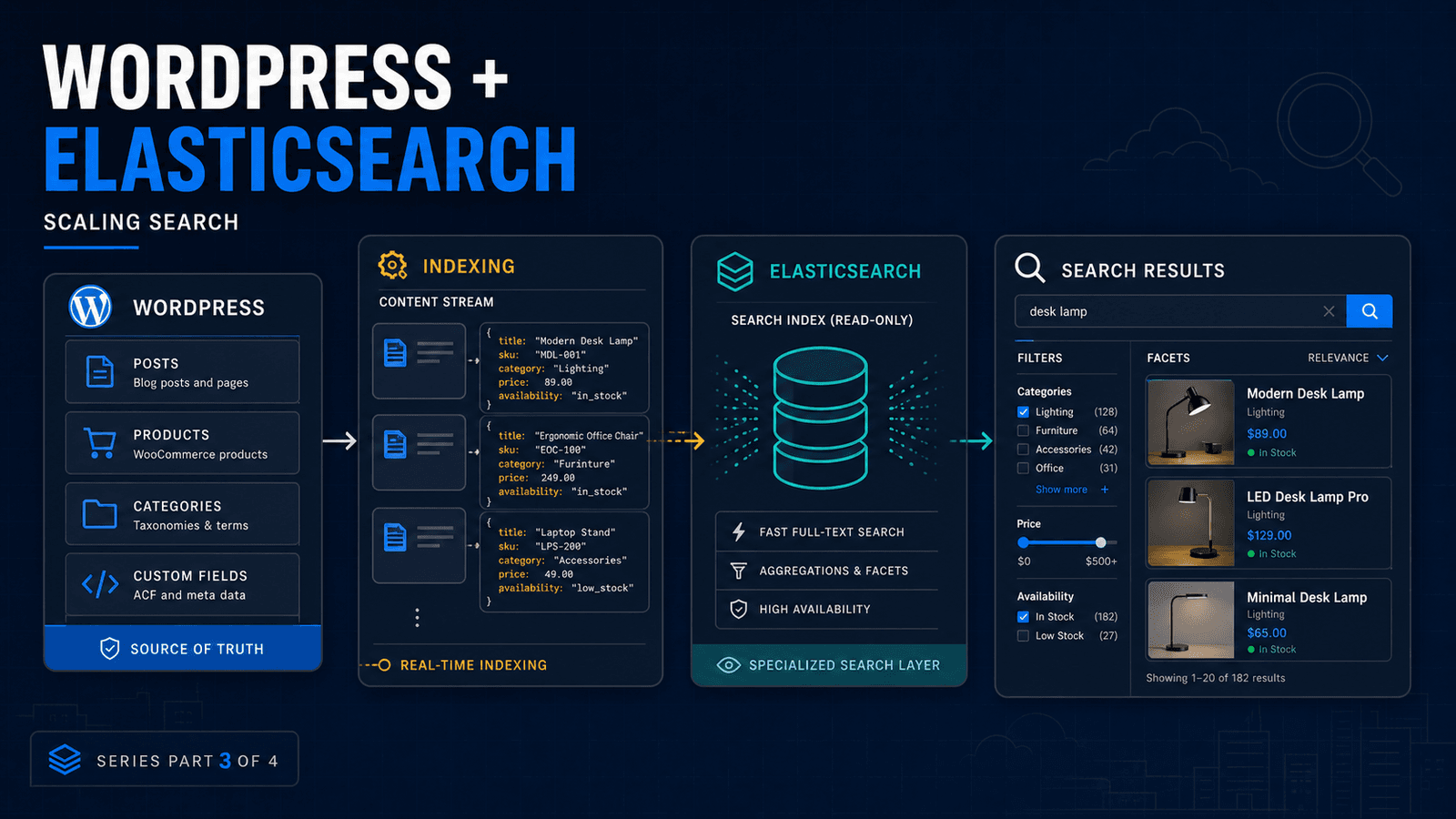
Not every WordPress search problem needs Elasticsearch.
That is probably the most important point to establish before discussing Elasticsearch at all.
If a business site contains 300 pages and visitors occasionally use the search box, introducing a separate Elasticsearch cluster is likely to create more maintenance than value.
The equation changes when search becomes a core product feature.
Think about:
- a marketplace
- large WooCommerce catalog
- property portal
- documentation platform
- recruitment site
- membership directory
- publishing archive
- application containing millions of searchable records
Now search is not simply another WordPress feature.
It is part of the application's infrastructure.
Why WordPress search eventually becomes limiting
WordPress search is built around its database and WP_Query.
That is useful because developers can query WordPress content through one familiar interface.
It also means the database remains involved in the search workload.
For modest datasets, that is completely reasonable.
At larger scales, teams often want things that go beyond simply matching a search term:
- weighted relevance
- fuzzy matching
- typo handling
- faceted navigation
- filtering across many properties
- autocomplete
- search analytics
- fast results across large indexes
Those are search-engine problems.
Elasticsearch is built specifically around indexing and retrieving documents for those kinds of workloads.
Elasticsearch should complement WordPress, not replace it
A common mistake is thinking that adopting Elasticsearch means replacing the WordPress database.
Usually, it does not.
I prefer to think about two separate responsibilities.
WordPress/MySQL
The source of truth.
This is where content is created, updated, permissioned and managed.
Elasticsearch
The searchable representation of that content.
When an article or product changes, the relevant searchable document is updated in the index.
When somebody searches, the query goes to Elasticsearch.
The result contains the IDs or documents needed to build the user-facing response.
That separation is important because search indexes should generally be rebuildable.
If the Elasticsearch index disappeared, you should be able to recreate it from the application's authoritative data.
You may not need to build this yourself
For normal WordPress content, ElasticPress already solves much of the integration work.
ElasticPress integrates Elasticsearch with WordPress search and works with normal WordPress search queries.
For many WordPress projects, that is where I would start.
Install the integration.
Configure the Elasticsearch service.
Index the content.
Test relevance.
Measure the result.
A completely custom search layer becomes more interesting when:
- WordPress is only one source of searchable data
- the documents do not map neatly to posts
- the frontend is largely decoupled
- the ranking rules are highly specialized
- the application needs custom APIs
- several systems share one search index
A typical WordPress search architecture
A larger implementation could look like this:
1. WordPress remains authoritative
Editors continue managing posts, products or application data normally.
2. Searchable documents are indexed
Relevant fields are converted into the structure Elasticsearch needs.
For a product, that might include:
product_id
title
description
sku
categories
attributes
price
availability
3. Updates trigger synchronization
When source data changes, the corresponding search document needs to change too.
That can happen synchronously for lightweight updates or through a background queue when indexing work becomes heavier.
4. Search requests go to Elasticsearch
The application sends the user's query and requested filters to the search engine rather than making the primary database perform the entire search workload.
5. WordPress builds the final response
Depending on the implementation, WordPress may receive matching IDs and load the required objects, or the frontend may work directly with data already returned from the search layer.
Search synchronization deserves as much attention as search itself
The easy demo is:
Type something. Get fast results.
The production problem is:
What happens when the search index is wrong?
Consider these cases:
- a product changes but indexing fails
- an item is deleted from WordPress but remains searchable
- thousands of updates happen during an import
- Elasticsearch is temporarily unavailable
- the index mapping changes
- an entire index needs rebuilding
A reliable search system needs visibility into synchronization.
It should be possible to know whether a record is:
- indexed
- outdated
- missing
- waiting for processing
- failed
That operational layer matters as much as the search query itself.
When Elasticsearch is worth it
I start considering it seriously when search has measurable business or technical importance.
Examples include:
Large catalogs
Users need to narrow thousands or millions of items quickly.
Complex filters
Search combines text with categories, ranges, attributes and other structured fields.
Relevance matters
The best result needs to appear first rather than merely returning something containing the keyword.
Search traffic is putting pressure on the primary database
Moving retrieval to a dedicated index can isolate that workload.
Multiple applications need the same search layer
For example, a WordPress administration system, public frontend and mobile app may all search the same dataset.
When I would stay with WordPress search
Do not introduce Elasticsearch just because the project is "enterprise."
Stay with the simpler architecture if:
- the dataset is modest
- search usage is low
- filtering is simple
- existing performance is acceptable
- the team cannot properly operate another service
- search is not important enough to justify the infrastructure
Every additional service needs monitoring, security, backups, upgrades and somebody who understands what to do when it fails.
That cost is part of the architecture.
Good search architecture is about choosing the right boundary
WordPress can remain excellent at managing the content while Elasticsearch becomes excellent at finding it.
That is a much better approach than trying to turn every WordPress database query into a search engine or, at the other extreme, introducing Elasticsearch before the application actually needs it.
Measure the workload.
Understand what users need from search.
Then choose the simplest system that can comfortably handle it.
Working with a WordPress application where search or filtering has become a performance problem?
Get in touch and I can help assess whether the right answer is query optimization, caching, ElasticPress or a more specialized search architecture.
Continue with:
Related Posts
Need help applying this to a real project?
Read the relevant service and case study, or send the current system for a practical review.