
Engineering note
Scaling WordPress Beyond the Default Stack: Databases, Search and Background Processing
A practical look at scaling WordPress with better data architecture, Elasticsearch, background processing, queues, and purpose-built infrastructure.
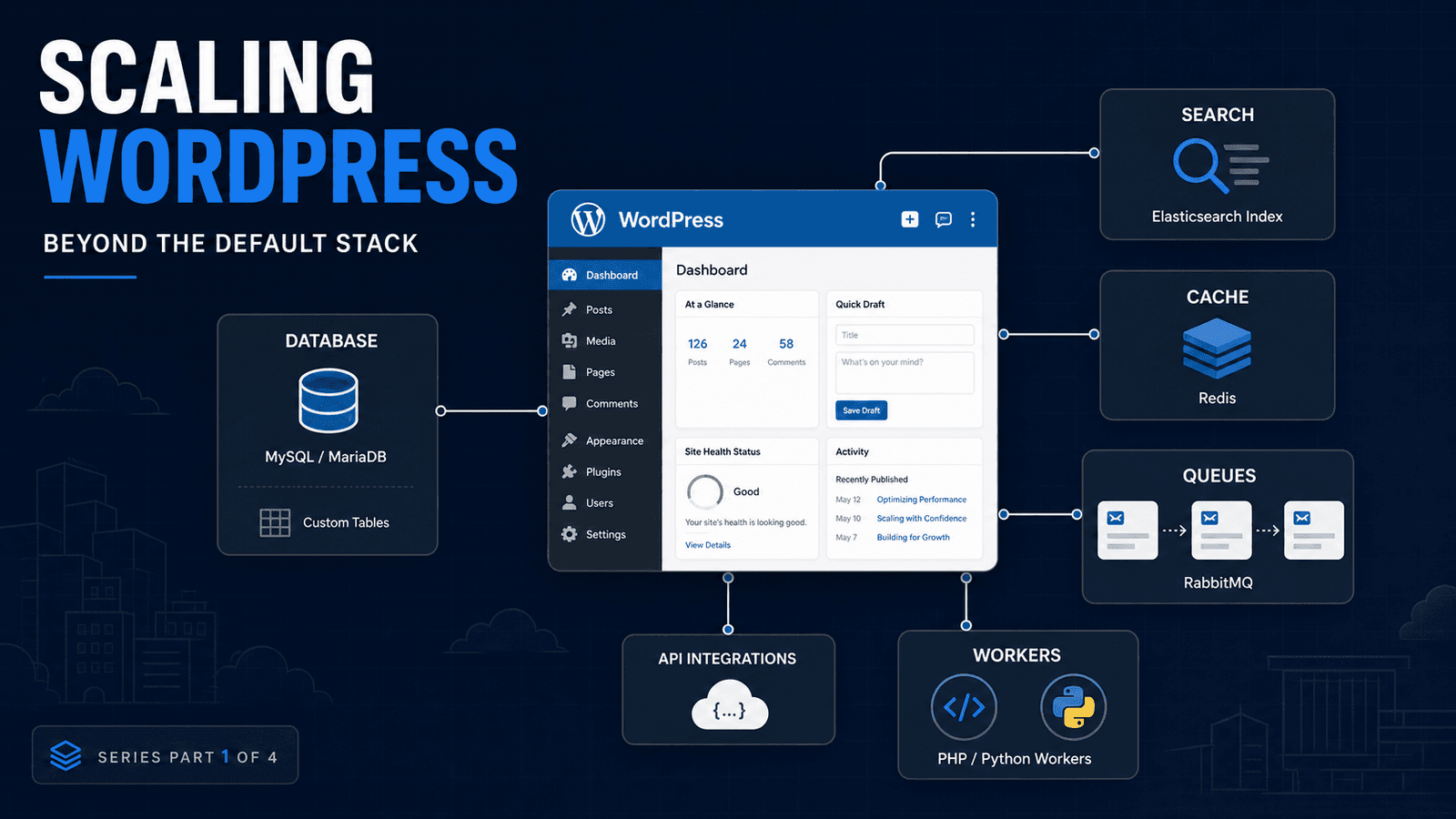
WordPress can handle considerably more than many developers give it credit for.
A slow WordPress site does not automatically need a different CMS, a larger server, or a collection of performance plugins. Very often, the real problem is simpler: the architecture no longer matches the workload.
I have worked with backend systems containing millions of records, and one lesson carries across almost every platform: you need to identify what is actually slow before replacing anything.
For WordPress, three areas tend to become important as applications grow:
- data storage and querying
- search
- long-running background work
WordPress already provides good tools for normal publishing and application workloads. The challenge starts when we make those tools handle data patterns they were never intended to optimize.
WordPress metadata is useful — until the data stops behaving like metadata
WordPress makes custom fields easy through post metadata.
For a normal site, that is exactly what you want.
You can attach things such as:
- a subtitle
- external ID
- product setting
- display preference
- additional content property
without creating another database table.
Problems start when metadata stops being supplementary information and becomes the application's primary dataset.
Imagine a plugin managing hundreds of thousands of records where users constantly filter by status, owner, type, date and several other properties.
WP_Meta_Query supports querying multiple metadata values, but those queries can introduce joins and increasingly complicated SQL as the query requirements grow.
At that point, I start asking a different question:
Is this still metadata, or is it really application data?
If the answer is application data, a dedicated table may be a better fit.
WordPress itself supports custom database tables for plugin-owned data when appropriate, while post metadata remains the simpler option for normal supplementary data.
WooCommerce provides a good real-world example of this principle.
Its High-Performance Order Storage architecture stores order data in dedicated tables optimized around WooCommerce order queries rather than relying entirely on the traditional posts and postmeta storage model.
The lesson is not that every plugin needs custom tables.
The lesson is that the storage model should follow the access pattern.
Read: WordPress Custom Tables vs postmeta →
Search does not have to remain a database problem
The next bottleneck usually appears when a WordPress site becomes heavily dependent on search.
A company site containing a few hundred pages probably does not need dedicated search infrastructure.
A marketplace, directory, documentation platform or large product catalog can be different.
Now the application may need:
- relevance scoring
- typo tolerance
- filters
- facets
- autocomplete
- fast searches across large datasets
- several searchable fields
At that point, continuously making the relational database do more search work may not be the best architecture.
This is where Elasticsearch becomes useful.
Instead of treating the relational database as both your source of truth and your search engine, WordPress can remain responsible for content while a separate search index handles retrieval.
For WordPress projects, this does not necessarily mean building a completely custom integration.
ElasticPress already integrates Elasticsearch-powered search with WordPress and can work with normal WordPress search queries.
A custom implementation makes more sense when the search requirements extend well beyond standard WordPress content or when WordPress is only one part of a larger system.
That distinction matters.
Elasticsearch should solve a real search problem, not simply make the architecture look more advanced.
Read: Scaling WordPress Search with Elasticsearch →
Heavy processing should not make users wait
The third problem appears when a normal web request starts carrying too much work.
Suppose an administrator uploads a CSV containing 50,000 records.
A basic implementation may try to:
- receive the file
- parse it
- validate every row
- call external APIs
- write the data
- return a response
all during the same request.
That creates a fragile user experience.
The import could hit PHP execution limits. An external API could slow down. A database problem halfway through processing could leave the operation incomplete.
Instead, the initial request should often do as little as possible.
Accept the work.
Validate enough to know it is safe.
Queue it.
Return control to the user.
Then process the workload separately.
WordPress has several levels of tooling for this.
WP-Cron handles scheduled work.
For plugin-level background jobs, Action Scheduler provides a traceable queue designed specifically for WordPress applications.
When processing moves outside WordPress entirely, message brokers such as RabbitMQ can connect WordPress to independent PHP, Python or other workers.
RabbitMQ acknowledgements also allow unfinished work to be redelivered if a worker disappears before acknowledging the task.
Again, these tools solve different problems.
Read: Background Processing in WordPress: Action Scheduler vs RabbitMQ →
More infrastructure is not automatically better architecture
There is a point where developers start solving performance problems by adding components:
Redis.
Elasticsearch.
RabbitMQ.
PostgreSQL.
More servers.
More queues.
More services.
That can make a system faster.
It can also create five new failure points to solve a problem that could have been fixed with one index.
Before changing architecture, I normally want answers to questions such as:
What query is actually slow?
How frequently does it run?
How large will the dataset realistically become?
Is the work synchronous because it needs to be?
Would an index solve the database problem?
Would caching solve it?
Does the search experience actually require Elasticsearch?
Does the workload need an external worker, or would Action Scheduler be enough?
Performance work becomes much easier once the bottleneck is measured instead of assumed.
What a scalable WordPress architecture can look like
For a demanding WordPress application, the final architecture might look something like this:
WordPress
handles content management, authentication, administration and the application interface.
MySQL/MariaDB
remains responsible for normal WordPress data and relational application data.
Custom tables
handle structured plugin data where the metadata model is no longer appropriate.
Redis
can reduce repeated database or application work where caching provides measurable value.
Elasticsearch
handles large or sophisticated search workloads.
Action Scheduler
runs WordPress-native background jobs.
RabbitMQ
connects workloads that need independent workers or services.
Python or PHP workers
handle processing that should not live inside the web request.
AWS or another infrastructure provider
supplies compute, storage, monitoring and supporting services where needed.
Not every WordPress project should contain all of those components.
Most should not.
The point is knowing when to introduce each one.
WordPress can scale. Its architecture has to scale with it.
I do not think the useful question is:
Can WordPress scale?
A better question is:
Does the current WordPress architecture match what this application is being asked to do?
For a content site, the default stack may be enough for years.
For a large WooCommerce operation, marketplace, SaaS-style plugin, directory or integration-heavy backend, parts of the workload may eventually belong somewhere else.
The goal is not to move away from WordPress.
The goal is to let WordPress do what it does well while giving specialized workloads to systems designed for them.
Working with a WordPress or WooCommerce backend that is starting to hit architectural limits?
Get in touch and I can help identify whether the problem is in the database, search layer, background processing, integrations or somewhere else entirely.
Related Posts
WordPress Custom Tables vs postmeta: Choosing the Right Data Architecture
Learn when WordPress postmeta is the right storage model, when custom database tables make more sense, and how to make the decision safely.
Read related postScaling WordPress Search with Elasticsearch
Learn when Elasticsearch makes sense for WordPress, how ElasticPress fits into the stack, and when native WordPress search is still enough.
Read related postBackground Processing in WordPress: Action Scheduler vs RabbitMQ
Compare WP-Cron, Action Scheduler and RabbitMQ for WordPress background jobs, integrations, imports and external worker architectures.
Read related postNeed help applying this to a real project?
Read the relevant service and case study, or send the current system for a practical review.