
Engineering note
Background Processing in WordPress: Action Scheduler vs RabbitMQ
Compare WP-Cron, Action Scheduler and RabbitMQ for WordPress background jobs, integrations, imports and external worker architectures.
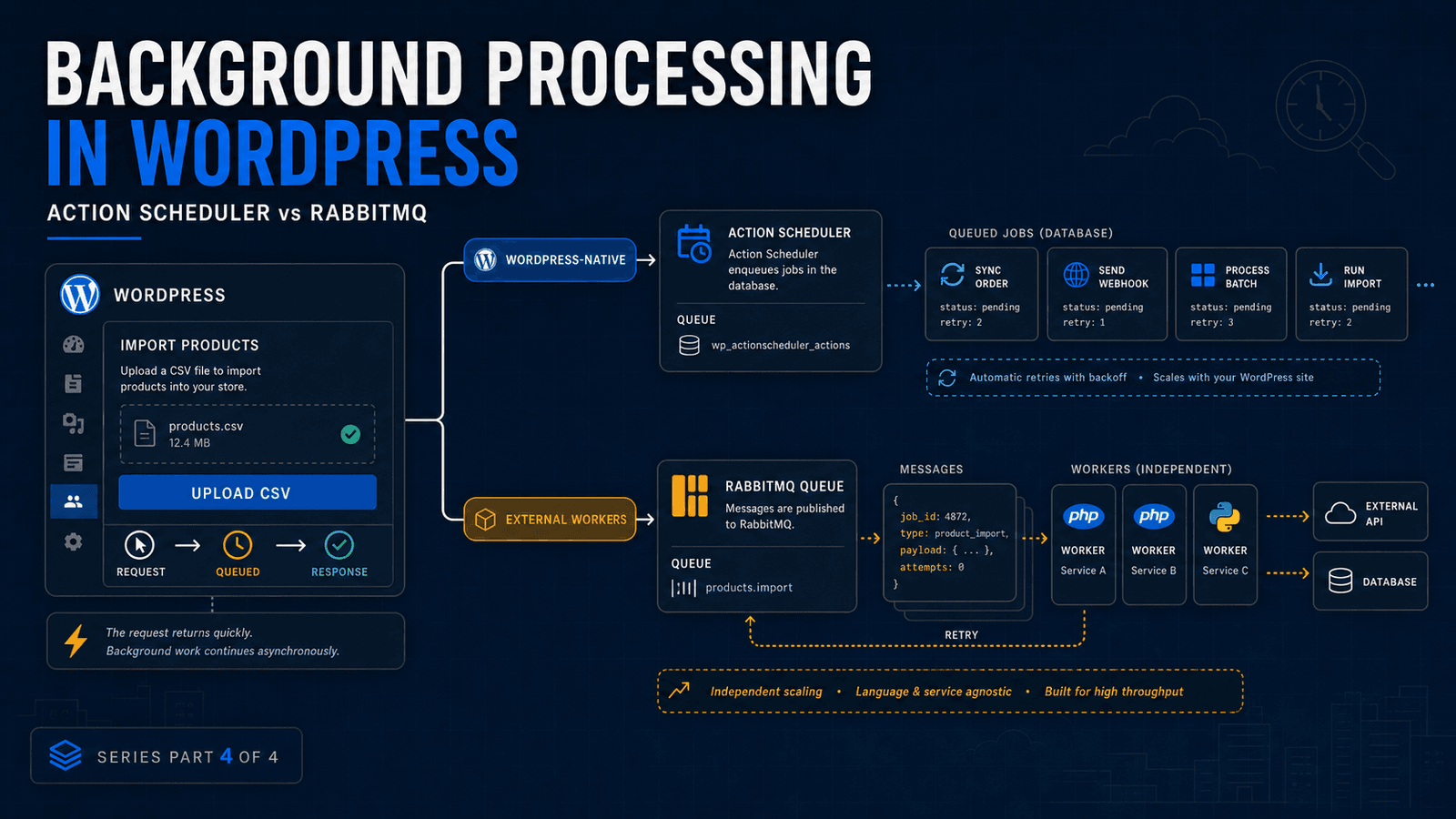
A user clicking "Import" should not necessarily mean that the web request has to finish the entire import.
The same applies to:
- sending thousands of emails
- synchronizing an ERP
- processing a large CSV
- generating reports
- indexing records
- resizing media
- calling several external APIs
- processing data feeds
These operations can take seconds, minutes or even hours.
Making the browser wait for them creates unnecessary coupling between the user interface and the backend workload.
The better architecture is often:
accept the request → queue the work → process it separately → report the result
WordPress provides more than one way to do this, and RabbitMQ is not always where I would start.
First: understand WP-Cron
WordPress includes WP-Cron for scheduled tasks.
It is useful for jobs such as:
- periodic cleanup
- publishing scheduled content
- checking something every few hours
- simple recurring plugin maintenance
It is important to understand how it works.
WP-Cron checks its list of scheduled tasks on page loads and runs work that is due.
That is different from a traditional system cron daemon running independently at an exact time.
On busy sites this may be perfectly adequate.
On sites requiring predictable scheduling, WP-Cron can also be triggered from the server's real task scheduler.
But scheduling and queue processing are not quite the same problem.
Action Scheduler is often the better WordPress-native queue
When a plugin needs background jobs rather than simple scheduled callbacks, I would look at Action Scheduler before introducing external queue infrastructure.
Action Scheduler is a scalable and traceable job queue designed for WordPress plugins.
That makes it suitable for workloads such as:
- processing batches
- delayed plugin actions
- integration jobs
- webhook processing
- scheduled synchronization
- WooCommerce-related background tasks
The major advantage is operational simplicity.
The queue stays within the WordPress environment.
Jobs can be inspected.
Developers do not immediately need another server component.
For many plugins, that is exactly the right tradeoff.
When RabbitMQ starts making sense
RabbitMQ solves a different class of problem.
It becomes particularly useful when the worker doing the job no longer needs to be WordPress itself.
Suppose WordPress receives a CSV containing 100,000 records.
The architecture could be:
WordPress Admin
      ↓
Upload CSV
      ↓
Object Storage
      ↓
RabbitMQ
      ↓
Python Workers
      ↓
Database / APIs
      ↓
Processing Status
      ↓
WordPress Admin
WordPress performs the small amount of work required to accept the job.
A message is then added to RabbitMQ containing something like:
{
  "job_id": 4872,
  "file": "imports/products-2026-08.csv",
  "type": "product_import"
}
The browser can receive a response without waiting for all 100,000 records.
One or more workers consume the queued task separately.
Now PHP request duration is no longer the boundary controlling how long the processing can run.
Why a message broker helps
RabbitMQ is not simply a place to store an array of jobs.
A broker gives applications a defined mechanism for producers and consumers to communicate.
For example, RabbitMQ supports message acknowledgements. A worker can acknowledge a message after successfully handling it; if the worker dies while processing an unacknowledged message, the work can be redelivered.
That becomes useful when jobs are important.
A failed process should not silently mean:
We think the import probably finished.
You want to know what completed and what did not.
The worker should be safe to run twice
Queues introduce another engineering requirement that is easy to overlook:
idempotency.
Imagine this:
- worker receives an order synchronization task
- worker sends the order to an ERP
- ERP accepts it
- worker crashes before marking the local job complete
- message is delivered again
What happens?
If the worker blindly repeats everything, the ERP may now contain two orders.
Background processing therefore needs more than a queue.
It needs:
- unique job identifiers
- safe retry behavior
- processing states
- error logging
- retry limits
- duplicate protection
- monitoring
The queue infrastructure can help, but the application still needs to be designed correctly.
Action Scheduler or RabbitMQ?
I use a simple question:
Where should the worker live?
If the worker naturally belongs inside WordPress, Action Scheduler is usually the simpler starting point.
If the workload belongs to an independent service, RabbitMQ becomes much more interesting.
Action Scheduler
Good fit for:
- WordPress plugin jobs
- WooCommerce background processing
- relatively self-contained integrations
- scheduled batches
- sites where introducing infrastructure would be unnecessary
Advantages:
- WordPress-native
- easier deployment
- admin visibility
- fewer moving parts
RabbitMQ
Good fit for:
- independent Python workers
- several backend services
- high-volume processing
- cross-application workflows
- jobs that should continue independently of the web application
- distributed processing
Advantages:
- clear producer/consumer separation
- independent worker scaling
- acknowledgements and redelivery
- language-independent architecture
- strong separation between the web application and processing layer
Neither one is "better."
They operate at different architectural levels.
What about calling an API after the page loads?
Sometimes developers avoid queues by moving the slow work into another HTTP request.
That can improve the immediate interface, but it does not automatically provide reliable background processing.
The operation may still:
- timeout
- fail silently
- execute twice
- be lost
- have no retry mechanism
For low-risk tasks that may be acceptable.
For important processing, I want the job represented somewhere durable enough that its state can be inspected.
Do not build a distributed system for a five-second task
This is worth stating clearly.
RabbitMQ is another service to:
- deploy
- secure
- monitor
- update
- troubleshoot
Workers need deployment and supervision.
Queue depth needs monitoring.
Failed jobs need somewhere to go.
That complexity is justified when it solves a real reliability or scaling problem.
It is not justified because a message broker looks good in an architecture diagram.
For a normal WordPress plugin, Action Scheduler may be everything you need.
For a simple scheduled task, WP-Cron may be enough.
For a large processing platform with Python workers and multiple services, RabbitMQ may be exactly right.
The senior engineering decision is knowing where that boundary sits.
Keep the web request small
One principle remains useful regardless of the technology:
Do not make users wait for work they do not need to wait for.
Receive the request.
Validate it.
Store enough information to process it safely.
Queue the expensive work when appropriate.
Give the user a clear status.
Then let the backend do its job.
That architecture improves more than perceived speed.
It makes integrations, imports and data processing easier to retry, observe and scale.
Building a WordPress integration that is getting too large for normal request-based processing?
Contact me if you want help designing the queue, worker or integration architecture.
For the complete architecture series:
Related Posts
Need help applying this to a real project?
Read the relevant service and case study, or send the current system for a practical review.