
Engineering note
WordPress Custom Tables vs postmeta: Choosing the Right Data Architecture
Learn when WordPress postmeta is the right storage model, when custom database tables make more sense, and how to make the decision safely.
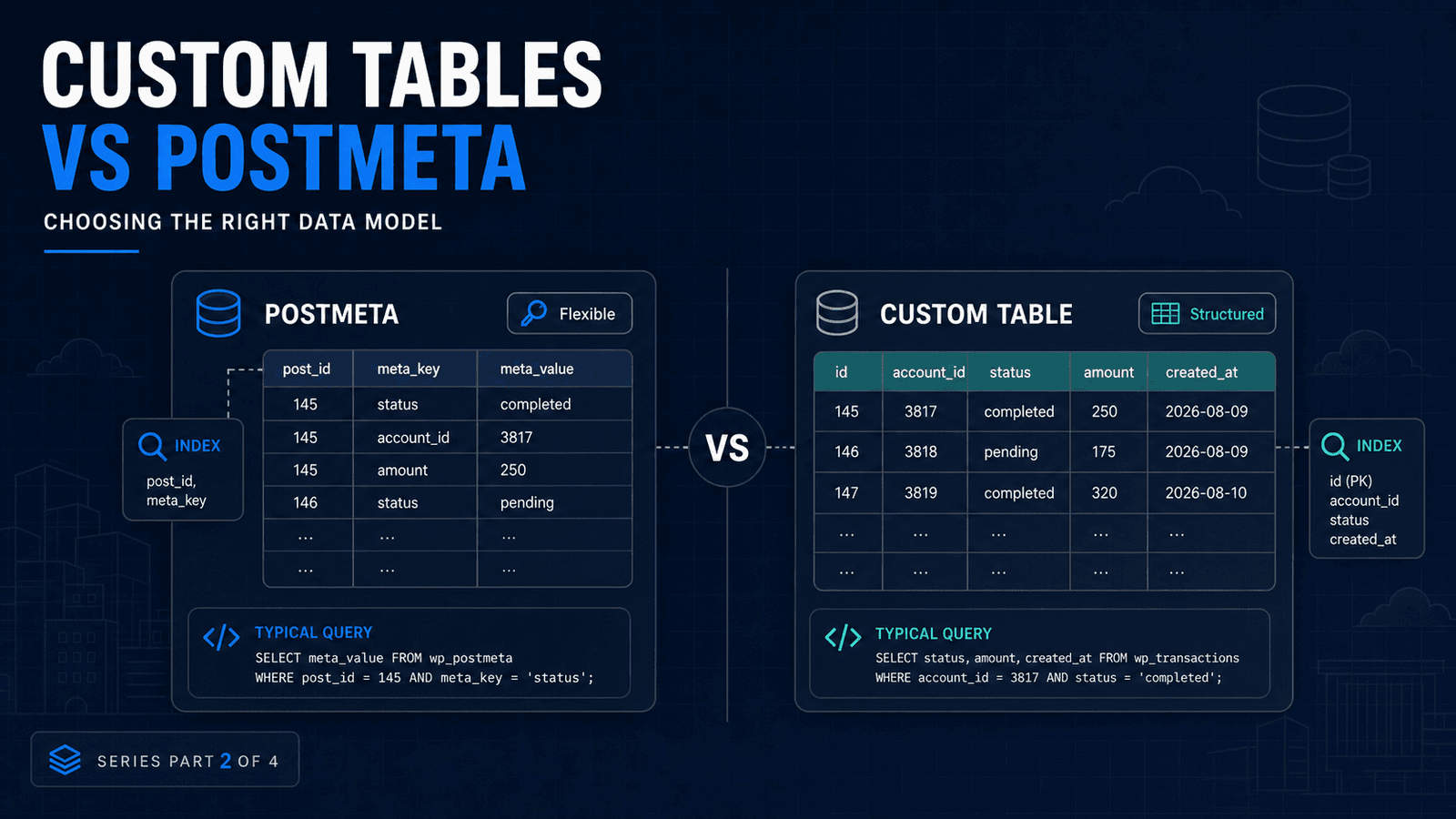
There is nothing inherently wrong with wp_postmeta.
It solves an important WordPress problem very well: attaching flexible additional information to content without requiring developers to change the database schema every time a new field is needed.
Trouble starts when developers use metadata to build something that is no longer really metadata.
That distinction matters much more than the size of the table alone.
What postmeta is good at
Imagine a custom post type for properties.
A property may have:
- an external reference number
- a featured flag
- an optional subtitle
- an internal note
- another small piece of supplementary information
Post metadata is a natural fit.
The WordPress API handles the storage.
Plugins can work with it.
Developers understand it.
You retain compatibility with the normal WordPress ecosystem.
So creating a custom table for every plugin is not good architecture.
It is additional architecture.
You should have a reason for it.
When metadata starts becoming the actual application
Now consider a different plugin.
It manages 500,000 transaction-like records.
Every record contains:
- account ID
- processing state
- value
- created date
- completion date
- external reference
- source
- destination
- retry count
Administrators need to filter and sort those records constantly.
That data does not behave like a few additional attributes attached to a WordPress post.
It behaves like a dataset.
Trying to represent every property as another meta row makes the data model convenient for writing generic WordPress code, but it may make the database do much more work when querying.
That is useful.
It does not mean every possible workload should be modeled that way.
Think about rows, not only records
Suppose you have 100,000 application records.
If each record contains 15 metadata values, that could mean roughly 1.5 million metadata rows before accounting for other content using the same table.
The number itself is not proof of a problem.
A well-indexed database can handle millions of rows.
What matters is how those rows are queried.
If the application repeatedly needs combinations such as:
status = completed
AND account_id = 3817
AND created_at >= 2026-01-01
ORDER BY amount DESC
a dedicated relational table can represent that workload much more naturally:
id
account_id
status
amount
created_at
completed_at
external_reference
Now indexes can be designed around the queries the application actually performs.
That is the real benefit of a custom table.
Not simply "fewer rows."
Better data shape and query control.
WooCommerce HPOS is a useful example
WooCommerce historically stored orders using the WordPress posts and postmeta architecture.
High-Performance Order Storage changed that by introducing dedicated WooCommerce tables optimized for order data and order queries.
That does not mean WooCommerce abandoned the WordPress database model.
It means orders had become important enough, structured enough and heavily queried enough to justify a purpose-built storage model.
That is exactly the question plugin developers should ask about their own datasets.
When I consider a custom WordPress table
A custom table starts becoming interesting when several of these conditions appear together:
The data has a stable structure
If every record reliably has fields such as status, owner, timestamp and amount, a relational schema may fit better than generic key/value storage.
Filtering is central to the application
If administrators or users repeatedly perform multi-column filtering, sorting and reporting, query design becomes important.
Records are not really content
A log entry, transaction, queue record, analytics event or synchronization state usually does not need to behave like a WordPress post.
The dataset grows continuously
High-volume append-heavy data such as logs and events can make a shared metadata table unnecessarily busy.
You need predictable indexes
A dedicated table allows indexes to be built specifically around your most important queries.
How I structure custom tables
For a plugin-owned table, I prefer to keep the architecture boring.
That is a compliment.
Define a clear schema.
Use WordPress database APIs such as $wpdb for database access where appropriate.
Keep SQL in a data-access layer instead of spreading queries across admin screens and hooks.
Create the table during plugin activation or migration.
Version the schema.
Add only indexes justified by real queries.
Use prepared statements.
Keep database changes backward-compatible where possible.
And write migration code assuming something will eventually fail halfway through.
A dedicated table gives you more control.
It also gives you more responsibility.
What I would not do
I would not move data to a custom table simply because:
- the site feels slow
wp_postmetacontains many rows- another large plugin uses custom tables
- PostgreSQL sounds faster
- a benchmark on somebody else's site looked impressive
First measure the query.
Use EXPLAIN.
Check indexes.
Inspect object caching.
Find repeated queries.
Look for unnecessary metadata conditions.
Check whether the application is loading far more data than it needs.
You may discover that the database model is fine and the implementation is the actual problem.
Custom tables vs postmeta is not an ideological decision
I use postmeta when the data behaves like metadata.
I consider custom tables when the data behaves like structured application records.
That approach keeps normal WordPress projects simple while still giving larger applications a path to scale when their requirements change.
The mistake is not using wp_postmeta.
The mistake is forcing every possible data model into it simply because WordPress makes it convenient.
Building a WordPress plugin or application with a growing dataset?
Contact me if you want help reviewing the schema, query patterns or migration strategy.
For the wider architecture, read:
Related Posts
Need help applying this to a real project?
Read the relevant service and case study, or send the current system for a practical review.